How we compared: we looked at what each service publicly offers at the time of writing. Plans, limits and domains change, so check the other service's own site for its latest details. BoltMail is our service, so we say so plainly and try to be fair about where the others are stronger.
Guerrilla Mail is a veteran of the disposable email world. It has been online for many years, it works without an account, and it is one of the few free services that lets you send email as well as receive it. That history earns respect, but the web has moved on. Here is how it compares with BoltMail today.
The short answer: Guerrilla Mail is a solid choice if you want a no-frills inbox that can also send a message. BoltMail is the better pick if you want a private link for each mailbox, a modern interface that works well on phones, and an API for automated tests.
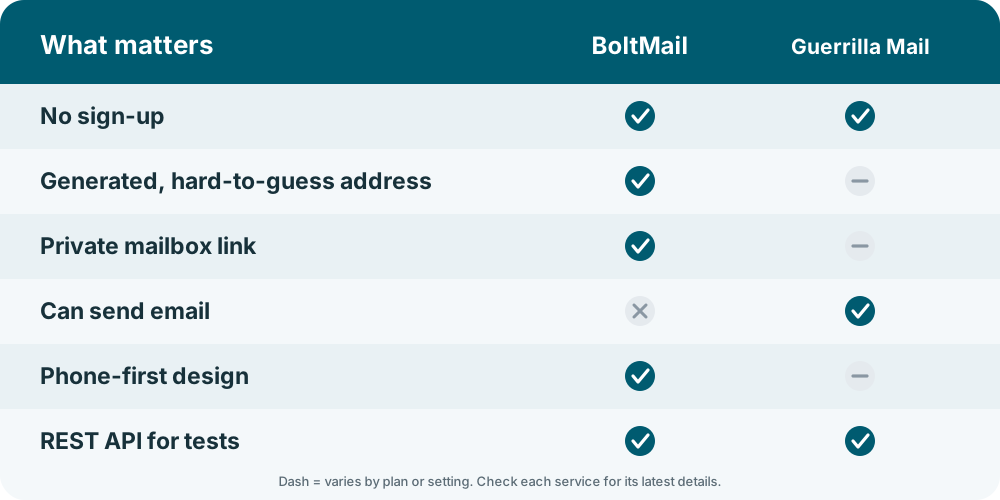
Guerrilla Mail vs BoltMail at a glance
| What you care about | BoltMail | Guerrilla Mail |
|---|---|---|
| Sign-up | None. | None. |
| Address style | Random words, one click, a private link to reopen the mailbox. | Random name that you can change to a custom alias. |
| Who can open the inbox | Only people with your mailbox link. | Custom aliases can be opened by anyone who knows or guesses the name. |
| How long mail is kept | Deleted automatically after 78 hours, or any time you delete it. | Short-lived: messages are cleared after a limited time. |
| Sending email | Receive-only, which keeps the service simple and hard to abuse. | Can send as well as receive. |
| Design on a phone | Modern, touch-friendly, installable to your home screen. | Functional, older look. |
| For developers | REST API with a step-by-step guide. | Offers an API for developers as well. |
Privacy: the custom alias trap
Guerrilla Mail lets you choose your own address name. That is convenient, but it means the inbox is only as private as the name is hard to guess. If you pick john123, anyone else who types john123 can look at the same inbox. For a newsletter you do not care about, that is fine. For a password reset or a one-time code, it is a real risk.
BoltMail takes the opposite approach. Addresses are generated, and each mailbox has its own secret link, so knowing the address is not enough to read the mail. If you want to understand the risk in more depth, our guide on whether temporary email is safe walks through it.
Sending email: a feature or a risk?
Being able to send from a disposable address is the thing Guerrilla Mail is best known for. It is handy for the odd reply. It is also the reason that some mail providers treat disposable senders with suspicion. BoltMail is receive-only on purpose. If your goal is to read a confirmation link, a code or a download link, you do not need to send anything.
Design and mobile experience
Guerrilla Mail looks and feels like a tool from an earlier era: dependable, plain and a little dense on a small screen. BoltMail is built phone-first, refreshes itself, and can be installed as a web app, so opening a new inbox takes a tap. If you mostly sign up for things from your phone, this will matter more than any feature table.
Will websites accept the address?
Because Guerrilla Mail is old and well known, its domains appear on many block lists. BoltMail is newer, which means fewer sites recognise its domains, although no disposable service is ever accepted everywhere. If a form says the address is invalid, read why websites block disposable emails and try a fresh address.
Developers and testers
Both services can be used from code. With BoltMail you create a mailbox through the REST API, wait for the message, read the code and delete the mailbox. The tutorial using the BoltMail API to receive verification emails in your tests has copy-and-paste examples, and disposable email for testing and development explains where it fits in a QA workflow.
Our verdict
- Choose Guerrilla Mail if you need to send a reply from a throwaway address or you like its long track record.
- Choose BoltMail if you want a private mailbox link, automatic deletion after 78 hours, a clean mobile experience and a scriptable API.
Frequently asked questions
Is BoltMail a good alternative to Guerrilla Mail?
Yes, if you mainly receive emails. It is free, needs no sign-up, keeps each inbox behind a private link and deletes messages automatically.
Can anyone read my Guerrilla Mail inbox?
If you choose a custom alias, anyone who knows or guesses that exact name can open the same inbox. That is why you should not use a guessable alias for anything sensitive.
Does BoltMail let me send email?
No. It is receive-only, which is all you need for verification links and codes and keeps the service cleaner.
Which is better on a phone?
BoltMail is designed phone-first and installs to your home screen as a web app. Guerrilla Mail works in a mobile browser but has an older layout.
Open your BoltMail inbox and see how it feels. It takes about a second.