How we compared: we looked at what each service publicly offers at the time of writing. Plans, limits and domains change, so check the other service's own site for its latest details. BoltMail is our service, so we say so plainly and try to be fair about where the others are stronger.
Temp-Mail.org is probably the first name that comes up when you search for a temporary email address, and for good reason: it is fast, free and has been around for years. But it is not the only good choice, and it is not the best fit for everyone. This guide puts it side by side with BoltMail so you can pick the right temp mail service in under five minutes.
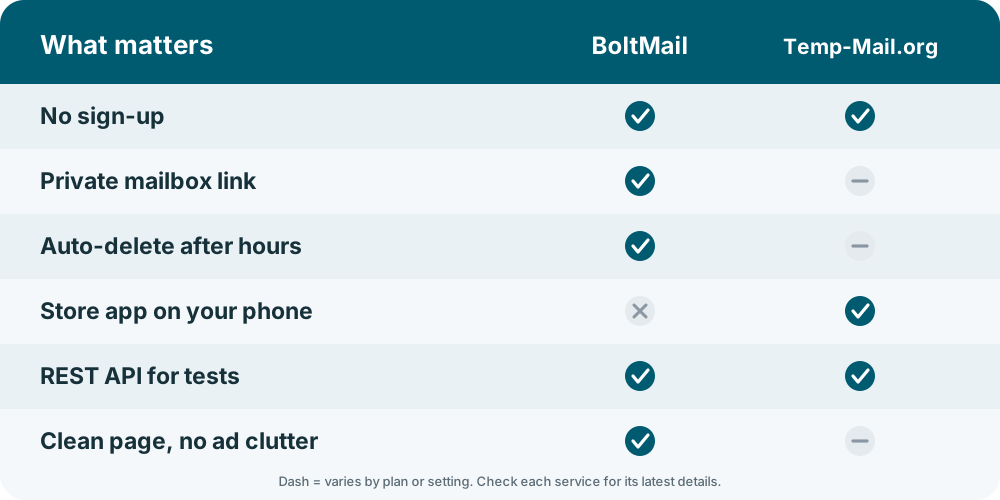
The short answer: both give you a free inbox with no sign-up. Choose BoltMail if you want a private link to your mailbox, a clean page without clutter, automatic clean-up and a REST API you can use in tests. Choose Temp-Mail.org if you specifically want its native mobile apps or its paid extras such as your own domain.
Temp-Mail.org and BoltMail in one table
| What you care about | BoltMail | Temp-Mail.org |
|---|---|---|
| Sign-up | None. Open the page and use the address. | None for the free web version. |
| How you get an address | Generated for you in one click, with a private link to reopen the mailbox. | Generated for you when the page loads; you can change it or pick your own name. |
| Who can read the inbox | Only someone with your mailbox link. | Tied to your browser session; a premium plan adds more control. |
| How long messages stay | Removed automatically after 78 hours, or sooner when you delete them. | Short-lived on the free plan; longer storage is part of the paid plan. |
| Mobile | Installable web app (add it to your home screen, no store download). | Native iOS and Android apps plus the website. |
| For developers | REST API for creating mailboxes and reading messages, see the developers page. | An API is offered separately, usually on a paid basis. |
| Your own domain | Not the focus of the service. | Available on premium plans. |
| Cost | Free to use. | Free to use, with a paid plan for extras. |
Privacy: who else can see your inbox?
This is the question that matters most, and it is where temp mail services differ the most. A temporary address is only as private as the way the inbox is opened. If anyone who guesses the address can read the mail, a password reset or a verification code is up for grabs.
BoltMail gives every mailbox its own secret link, so the address alone is not enough to open it. Temp-Mail.org keeps the inbox attached to your browser session, which works well for one-off use but is a different model: the address you see is the key. For the full picture on what is safe to use a temporary inbox for, read is temporary email safe?
Speed and ease of use
Both services are quick. You open the page, copy the address and wait for the message. BoltMail refreshes your inbox for you, so there is no button to press, and it is built to stay out of the way: one address, one inbox, one clear delete button. Temp-Mail.org offers a few more options on the page (change address, refresh, copy, premium upsell), which some people like and others find busy.
Ads and distractions
Free services have to pay their bills somehow. The free web version of Temp-Mail.org shows advertising, and a paid plan removes it. BoltMail is designed around a clean, focused inbox first. If a page full of banners makes it hard to spot the real message or the verification code, that alone can decide it.
Mobile: web app or store app?
If you want an app from the App Store or Google Play, Temp-Mail.org has one. If you would rather not install anything from a store, BoltMail works as an installable web app: open the site on your phone and add it to your home screen. It launches full-screen like an app, updates itself and takes almost no space.
Will the websites you sign up on accept the address?
Here the honest answer is the same for every temp mail service: some websites block known disposable domains. Popular services are blocked more often, simply because their domains are on more block lists. If a site rejects an address, generate a new one on a different domain or try the other service. We explain why in why websites block disposable emails.
For developers and testers
If you test sign-up flows, a throwaway inbox you can create and read from code saves hours. BoltMail has a REST API for exactly that: create a mailbox, wait for the message, read the code, delete the mailbox. Our step-by-step guide shows it in PHP, Python and JavaScript, and the developers page has the reference.
Which one should you choose?
- Pick BoltMail if you want a private mailbox link, automatic deletion after 78 hours, a clean page and an API you can script.
- Pick Temp-Mail.org if you want a store app on your phone, or you plan to pay for extras such as a custom domain.
- Keep both handy. If one address is rejected by a website, the other often works.
Whichever you use, keep temp mail for things you do not need to recover later. Never use it for banking, work accounts or anything you may need a password reset for. More on choosing well in our checklist: best temporary email services: what to look for.
Frequently asked questions
Is BoltMail a good Temp-Mail.org alternative?
Yes. It is free, needs no sign-up, gives every mailbox a private link and deletes messages automatically, so it covers the same everyday jobs: confirmation links, one-time codes and free downloads.
Is Temp-Mail.org safe to use?
It is safe for low-risk sign-ups. As with any temporary email service, do not use it for accounts you care about, because you may not be able to recover the inbox later.
Which has fewer ads, BoltMail or Temp-Mail.org?
The free web version of Temp-Mail.org shows ads and its paid plan removes them. BoltMail focuses on a clean inbox, so you can read your message without hunting past banners.
Can I use both services at the same time?
Yes. Because they use different domains, a website that blocks one will often accept the other.
Does BoltMail have an app like Temp-Mail.org?
It is an installable web app rather than a store app. Open it on your phone and add it to your home screen to launch it like any other app.
Try BoltMail free: your temporary address is ready the moment the page opens.