How we compared: we looked at what each service publicly offers at the time of writing. Plans, limits and domains change, so check the other service's own site for its latest details. BoltMail is our service, so we say so plainly and try to be fair about where the others are stronger.
Mailinator is a famous name among developers and testers. Its trick is simple: any name at its public domain is a working inbox, and anyone can open any inbox. That is brilliant for a quick test and risky for a real sign-up. We compare it with BoltMail, where every mailbox sits behind its own private link.
The short answer: use Mailinator's public inboxes for throwaway tests where nothing sensitive is sent. Use BoltMail when the message matters to you, such as a verification code, a reset link or a download, because only you hold the link to your mailbox.
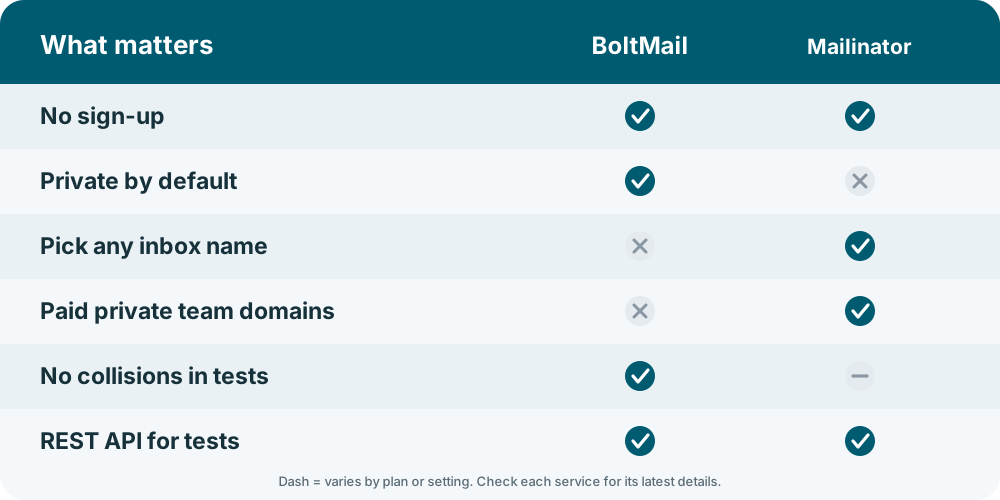
Mailinator vs BoltMail at a glance
| What you care about | BoltMail | Mailinator |
|---|---|---|
| Sign-up | None. | None for public inboxes; accounts for private features. |
| Who can read an inbox | Only the holder of the mailbox link. | Anyone who types the same name, for public inboxes. |
| Choose your own name | Addresses are generated for you. | Yes, any name works instantly. |
| How long messages stay | 78 hours, or until you delete them. | Public messages are cleared after a short period. |
| Best for | Sign-ups, downloads, one-time codes. | Developer and QA testing. |
| Private domains and teams | Not the focus. | Offered on paid plans. |
| API | REST API for creating mailboxes and reading messages. | API available, with paid tiers. |
The public inbox problem
A public inbox is like writing your message on a notice board. If you sign up somewhere with myname@ a public domain, anyone who guesses myname can read the confirmation email, click the link, and in some cases take over the account. Web crawlers and bots do watch popular public inboxes for exactly this reason.
That is not a flaw in Mailinator. It is the design, and it is why developers love it: no setup, no account, just type a name. But it is the wrong tool for anything you would mind a stranger seeing. BoltMail removes the guesswork: addresses are generated, and the mailbox opens only from your private link. For the bigger picture read is temporary email safe?
Testing and QA
For a sign-up test, a public inbox is convenient because you can invent addresses on the fly. The downside is collisions and noise: another tester may be using the same name. With BoltMail each test creates its own mailbox through the REST API, waits for the email, reads the code and deletes the mailbox, so runs never interfere with each other. We walk through it in using the BoltMail API in your tests, and the broader checklist is in how to test email verification flows.
Blocking by websites
Mailinator is the most widely blocked disposable domain on the internet, because every sign-up form that screens for disposable email lists it first. BoltMail is less well known, so fewer forms recognise it, though you should expect some to reject any disposable address. See why websites block disposable emails.
Which one should you choose?
- Mailinator for fast, public, throwaway test inboxes where privacy does not matter, or if you need paid private domains for a team.
- BoltMail for anything where the message is yours alone: sign-ups, codes, downloads and automated tests that should not collide.
Frequently asked questions
Is Mailinator private?
Its free public inboxes are not. Anyone who types the same name can open the inbox, so avoid sensitive messages there.
What is a good Mailinator alternative with private inboxes?
BoltMail gives every mailbox a private link, so only the person who created it can open it.
Can I use BoltMail for automated testing instead of Mailinator?
Yes. The REST API lets a test create a mailbox, wait for a message, read the content and delete the mailbox.
Why do so many websites reject Mailinator addresses?
It is the best-known disposable domain, so it sits on almost every block list. Other services are blocked less often, but none are accepted everywhere.
Create a private BoltMail mailbox and keep your messages to yourself.